> ## Documentation Index
> Fetch the complete documentation index at: https://docs.covianalytics.com/llms.txt
> Use this file to discover all available pages before exploring further.
# Actions Register
> View, search, and manage all actions in one place.
## Overview
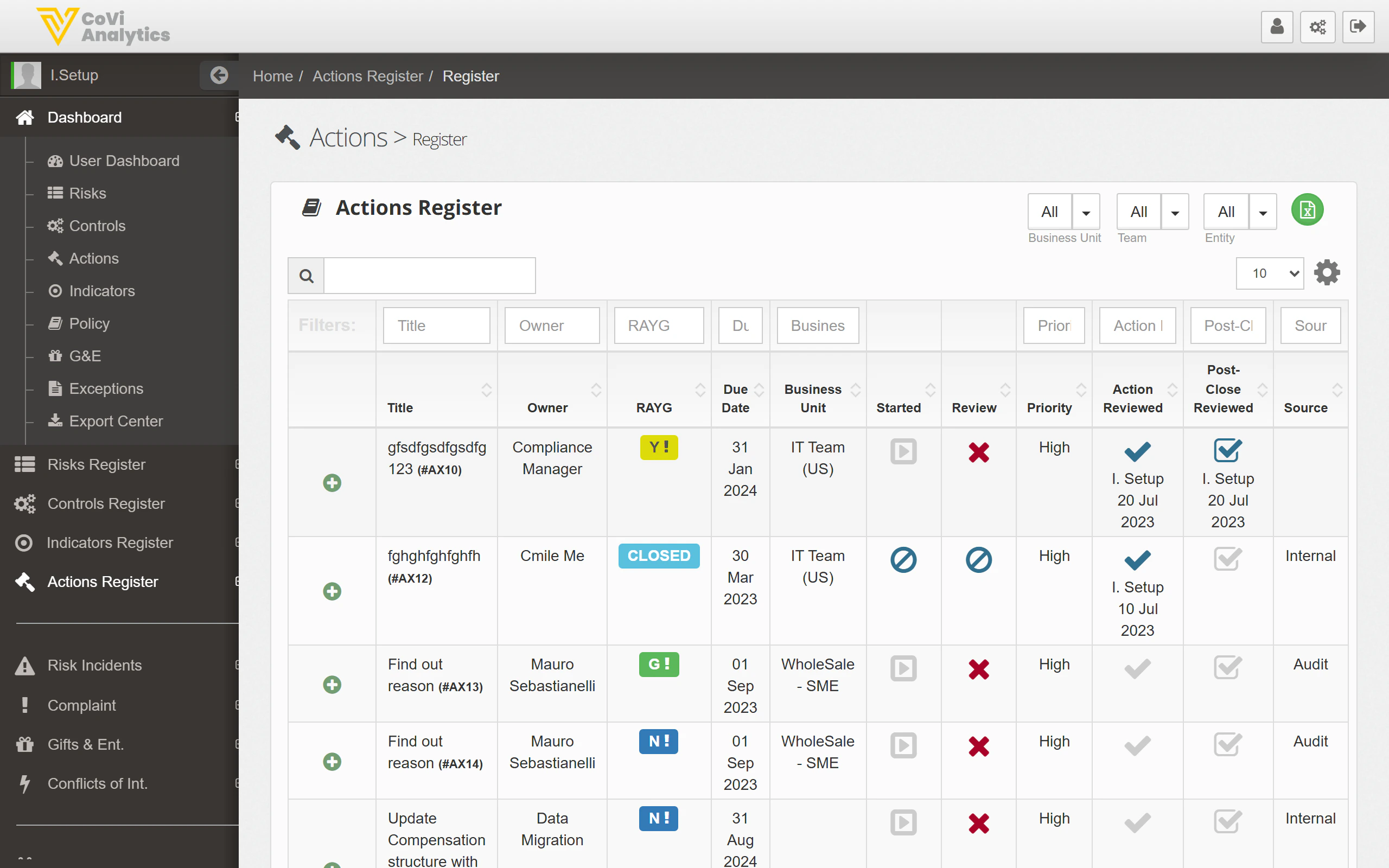
The Actions Register is the master list of every action in your organisation. Use it to find specific actions, review their status, and navigate to individual action records for editing or follow-up.
From the sidebar, expand **Actions Register** and click **Register**.
 ## How to use it
### Searching and filtering
* **Search box** — type any keyword to search across all action fields
* **Column filters** — use the filter row beneath the column headers to narrow by Title, Type, Owner, Status, or other fields
* **Dropdown filters** — the dropdowns above the table let you filter by Business Unit, Team, and Entity before the table loads
### Understanding the columns
| Column | What it shows |
| ------------ | ------------------------------------------------------------------------------- |
| **Title** | The action name — click it to open the full [Action Card](/actions/action-card) |
| **Type** | The action type (e.g., Remediation, Improvement, Compliance) |
| **Owner** | The person responsible for completing the action |
| **Status** | The current status of the action (e.g., Open, In Progress, Closed) |
| **Due Date** | When the action is expected to be completed |
| **Entity** | The legal entity this action belongs to |
### Action buttons
The icons in the top-right corner of the register give you quick access to:
* **Add new action** (green plus icon) — creates a new action record
* **Export** (download icon) — export the current view to a spreadsheet
* **Print** — generate a printable version of the register
### Pagination
Use the **Previous** / **Next** buttons and the rows-per-page dropdown (10, 25, 50, 100) to navigate through large lists.
## Tips & Tricks
Combine column filters with the global search for precise results. For example, filter by Entity first, then search for a keyword in the action title.
Click any column header to sort the register by that field. Click again to reverse the sort order.
If you need to review all overdue actions, it may be quicker to use the [Actions Dashboard](/actions/dashboard) and click the **Overdue** tile — it pre-filters for you.
The Actions Register follows the same layout as the [Control Register](/controls/register) and [Indicators Register](/indicators/register). The search and filter controls work identically across all registers.
## How to use it
### Searching and filtering
* **Search box** — type any keyword to search across all action fields
* **Column filters** — use the filter row beneath the column headers to narrow by Title, Type, Owner, Status, or other fields
* **Dropdown filters** — the dropdowns above the table let you filter by Business Unit, Team, and Entity before the table loads
### Understanding the columns
| Column | What it shows |
| ------------ | ------------------------------------------------------------------------------- |
| **Title** | The action name — click it to open the full [Action Card](/actions/action-card) |
| **Type** | The action type (e.g., Remediation, Improvement, Compliance) |
| **Owner** | The person responsible for completing the action |
| **Status** | The current status of the action (e.g., Open, In Progress, Closed) |
| **Due Date** | When the action is expected to be completed |
| **Entity** | The legal entity this action belongs to |
### Action buttons
The icons in the top-right corner of the register give you quick access to:
* **Add new action** (green plus icon) — creates a new action record
* **Export** (download icon) — export the current view to a spreadsheet
* **Print** — generate a printable version of the register
### Pagination
Use the **Previous** / **Next** buttons and the rows-per-page dropdown (10, 25, 50, 100) to navigate through large lists.
## Tips & Tricks
Combine column filters with the global search for precise results. For example, filter by Entity first, then search for a keyword in the action title.
Click any column header to sort the register by that field. Click again to reverse the sort order.
If you need to review all overdue actions, it may be quicker to use the [Actions Dashboard](/actions/dashboard) and click the **Overdue** tile — it pre-filters for you.
The Actions Register follows the same layout as the [Control Register](/controls/register) and [Indicators Register](/indicators/register). The search and filter controls work identically across all registers.