> ## Documentation Index
> Fetch the complete documentation index at: https://docs.covianalytics.com/llms.txt
> Use this file to discover all available pages before exploring further.
# Conflicts of Interest Log
> Declare, assess, and manage conflicts of interest across your organisation.
## Overview
The Conflicts of Interest Log is where your organisation records and tracks all declared conflicts. Whether a conflict is internal or external, this register helps you document the source, type, and response, ensuring you meet your governance obligations and can demonstrate oversight to regulators.
## How to use it
### Viewing conflicts
The log displays all declared conflicts in a structured table. Each row represents a single conflict record:
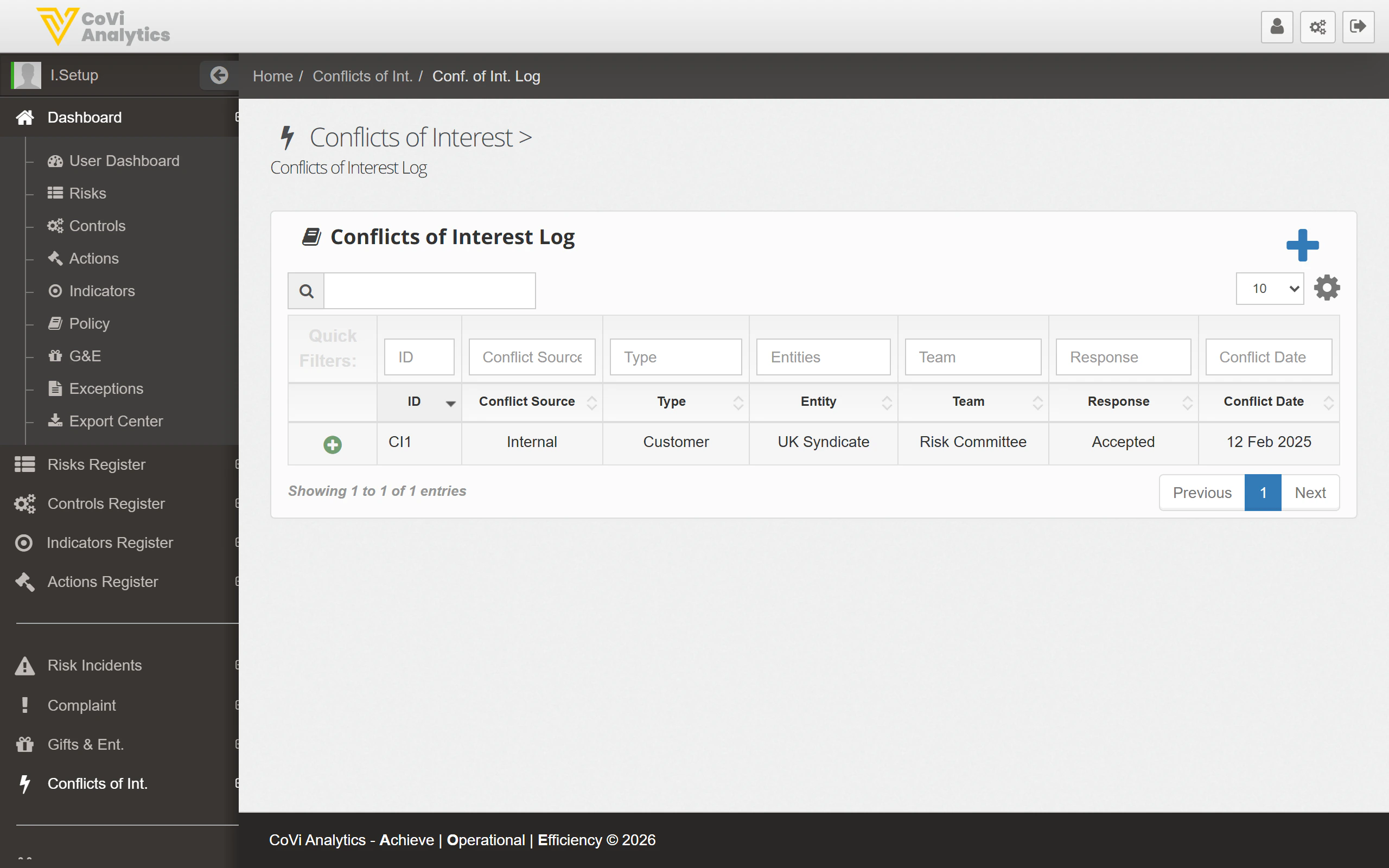 * **ID** — The unique identifier for the conflict (e.g. CI1).
* **Conflict Source** — Whether the conflict is Internal or External.
* **Type** — The nature of the conflict, such as Customer, Supplier, or Personal.
* **Entity** — The legal entity to which the conflict relates (e.g. UK Syndicate).
* **Team** — The team responsible for managing the conflict.
* **Response** — The action taken, such as Accepted, Mitigated, or Avoided.
* **Conflict Date** — The date the conflict was declared or identified.
### Filtering and searching
Use the **search box** to locate a specific conflict by ID or keyword. The filter row beneath the column headers lets you narrow results by any column value, such as showing only Internal conflicts or those with a specific response type.
### Declaring a new conflict
Click the blue **+** button to open the conflict declaration form. You will need to specify the conflict source, type, affected entity, and the proposed response.
### Pagination
Use the pagination controls at the bottom of the table to move through the register when you have a large number of declared conflicts.
## Tips & Tricks
Encourage staff to declare conflicts early, even if they are uncertain whether a genuine conflict exists. It is better to record and assess a potential conflict than to miss one entirely.
The available conflict types and response options are configurable. Administrators can update these lists in [Configuration](/admin/configuration) under the **Conflicts of Interest** tab.
Conflicts marked as **Accepted** should be reviewed periodically to confirm the acceptance rationale remains valid. Changes in circumstances may require a different response.
For broader governance context, see [Risk Incidents Log](/incidents/log) for incidents that may arise from unmanaged conflicts, and [User Management](/admin/user-management) for role-based access that can help prevent conflicts.
* **ID** — The unique identifier for the conflict (e.g. CI1).
* **Conflict Source** — Whether the conflict is Internal or External.
* **Type** — The nature of the conflict, such as Customer, Supplier, or Personal.
* **Entity** — The legal entity to which the conflict relates (e.g. UK Syndicate).
* **Team** — The team responsible for managing the conflict.
* **Response** — The action taken, such as Accepted, Mitigated, or Avoided.
* **Conflict Date** — The date the conflict was declared or identified.
### Filtering and searching
Use the **search box** to locate a specific conflict by ID or keyword. The filter row beneath the column headers lets you narrow results by any column value, such as showing only Internal conflicts or those with a specific response type.
### Declaring a new conflict
Click the blue **+** button to open the conflict declaration form. You will need to specify the conflict source, type, affected entity, and the proposed response.
### Pagination
Use the pagination controls at the bottom of the table to move through the register when you have a large number of declared conflicts.
## Tips & Tricks
Encourage staff to declare conflicts early, even if they are uncertain whether a genuine conflict exists. It is better to record and assess a potential conflict than to miss one entirely.
The available conflict types and response options are configurable. Administrators can update these lists in [Configuration](/admin/configuration) under the **Conflicts of Interest** tab.
Conflicts marked as **Accepted** should be reviewed periodically to confirm the acceptance rationale remains valid. Changes in circumstances may require a different response.
For broader governance context, see [Risk Incidents Log](/incidents/log) for incidents that may arise from unmanaged conflicts, and [User Management](/admin/user-management) for role-based access that can help prevent conflicts.