> ## Documentation Index
> Fetch the complete documentation index at: https://docs.covianalytics.com/llms.txt
> Use this file to discover all available pages before exploring further.
# Exceptions
> Track and manage exceptions raised against controls and risk events, with full change history.
## Overview
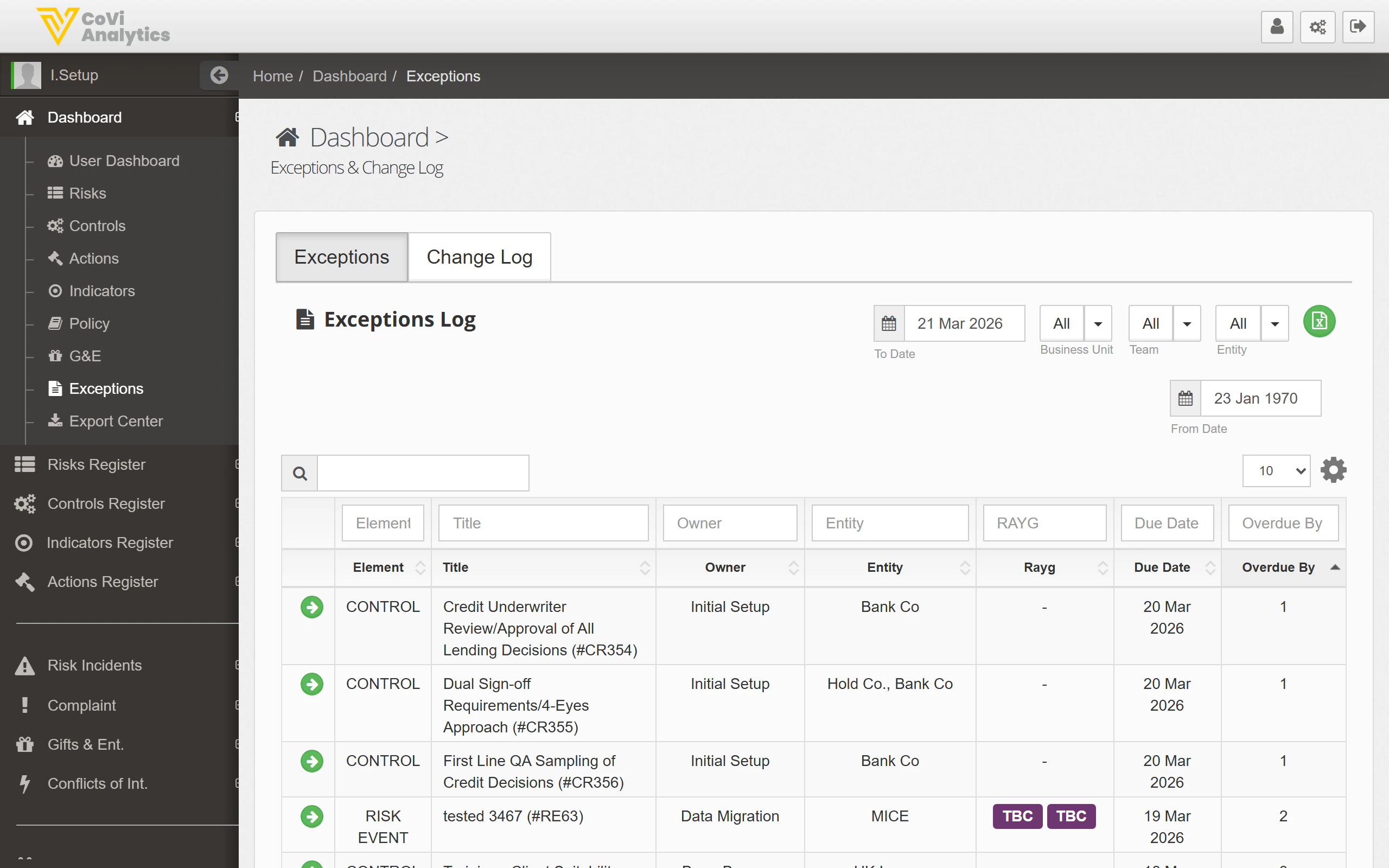
The Exceptions page is where you monitor and manage all formal exceptions within CORE. An exception is raised when a control is not operating as expected or a risk event requires time-limited remediation. This page helps you track every open exception, see who owns it, understand how overdue it is, and review the full change log for audit purposes.
## How to use it
### Tabs
The page has two tabs:
* **Exceptions** — the default view, showing the active exceptions register.
* **Change Log** — a chronological record of all changes made to exception records, useful for audit trails and governance reviews.
### Filters and search
Above the exceptions table, a set of filters lets you narrow the view:
| Filter | What it does |
| ----------------- | ------------------------------------------------------------------------ |
| **From Date** | Show only exceptions created on or after this date. |
| **To Date** | Show only exceptions created on or before this date. |
| **Business Unit** | Restrict to a specific business unit. |
| **Team** | Restrict to a specific team. |
| **Entity** | Restrict to a specific legal entity. |
| **Search box** | Free-text search across exception titles, reference numbers, and owners. |
Apply one or more filters in combination to find exactly the exceptions you need. For example, filter by Entity and set a date range to prepare for a quarterly governance committee.
 ### Exceptions table
The core of the page is the exceptions register. Each row represents a single exception, with the following columns:
| Column | What it shows |
| --------------- | ------------------------------------------------------------------------------------------------------------------------------------------------------------ |
| **Element** | Whether the exception relates to a **CONTROL** or a **RISK EVENT**. |
| **Title** | The name and reference number of the exception (e.g. "Credit Underwriter Review/Approval of All Lending Decisions (#CR354)"). Click to open the full record. |
| **Owner** | The individual responsible for resolving the exception. |
| **Entity** | The legal entity the exception applies to. |
| **RAYG rating** | A Red/Amber/Yellow/Green status indicating the severity or risk level of the exception. |
| **Due Date** | The target date for resolution. |
| **Overdue By** | How many days past the due date the exception is, if applicable. Items not yet overdue show no value. |
You can sort by any column. Sorting by **Overdue By** in descending order is a quick way to surface the most pressing items.
### Pagination
The table is paginated. Use the controls at the bottom to navigate between pages or adjust the number of records displayed per page.
### Change Log tab
Switch to the **Change Log** tab to see a time-stamped record of every update made to exception records. This includes status changes, ownership transfers, due date extensions, and any notes added. The change log is read-only and supports the same filter controls as the main exceptions tab.
## Tips & Tricks
Sort the exceptions table by **Overdue By** (descending) at the start of each week to prioritise the most critical items. Addressing long-overdue exceptions first reduces accumulated risk and demonstrates proactive governance to regulators.
Extending the due date on an exception resets the **Overdue By** counter but does not remove the original due date from the change log. Auditors can see every extension, so ensure each one is justified with a clear rationale in the exception record.
Exceptions may be linked to controls or risk events tracked elsewhere in CORE. Use the **Element** column to understand the source, then cross-reference with the [Controls](/controls) or [Risks](/risks) registers for the full picture. You can also export exception data from the [Export Center](/export/center).
### Exceptions table
The core of the page is the exceptions register. Each row represents a single exception, with the following columns:
| Column | What it shows |
| --------------- | ------------------------------------------------------------------------------------------------------------------------------------------------------------ |
| **Element** | Whether the exception relates to a **CONTROL** or a **RISK EVENT**. |
| **Title** | The name and reference number of the exception (e.g. "Credit Underwriter Review/Approval of All Lending Decisions (#CR354)"). Click to open the full record. |
| **Owner** | The individual responsible for resolving the exception. |
| **Entity** | The legal entity the exception applies to. |
| **RAYG rating** | A Red/Amber/Yellow/Green status indicating the severity or risk level of the exception. |
| **Due Date** | The target date for resolution. |
| **Overdue By** | How many days past the due date the exception is, if applicable. Items not yet overdue show no value. |
You can sort by any column. Sorting by **Overdue By** in descending order is a quick way to surface the most pressing items.
### Pagination
The table is paginated. Use the controls at the bottom to navigate between pages or adjust the number of records displayed per page.
### Change Log tab
Switch to the **Change Log** tab to see a time-stamped record of every update made to exception records. This includes status changes, ownership transfers, due date extensions, and any notes added. The change log is read-only and supports the same filter controls as the main exceptions tab.
## Tips & Tricks
Sort the exceptions table by **Overdue By** (descending) at the start of each week to prioritise the most critical items. Addressing long-overdue exceptions first reduces accumulated risk and demonstrates proactive governance to regulators.
Extending the due date on an exception resets the **Overdue By** counter but does not remove the original due date from the change log. Auditors can see every extension, so ensure each one is justified with a clear rationale in the exception record.
Exceptions may be linked to controls or risk events tracked elsewhere in CORE. Use the **Element** column to understand the source, then cross-reference with the [Controls](/controls) or [Risks](/risks) registers for the full picture. You can also export exception data from the [Export Center](/export/center).