> ## Documentation Index
> Fetch the complete documentation index at: https://docs.covianalytics.com/llms.txt
> Use this file to discover all available pages before exploring further.
# L3 Risk Log
> Browse and manage your Level 3 risk taxonomy, linking granular risk descriptions to controls and higher-level risk categories.
## Overview
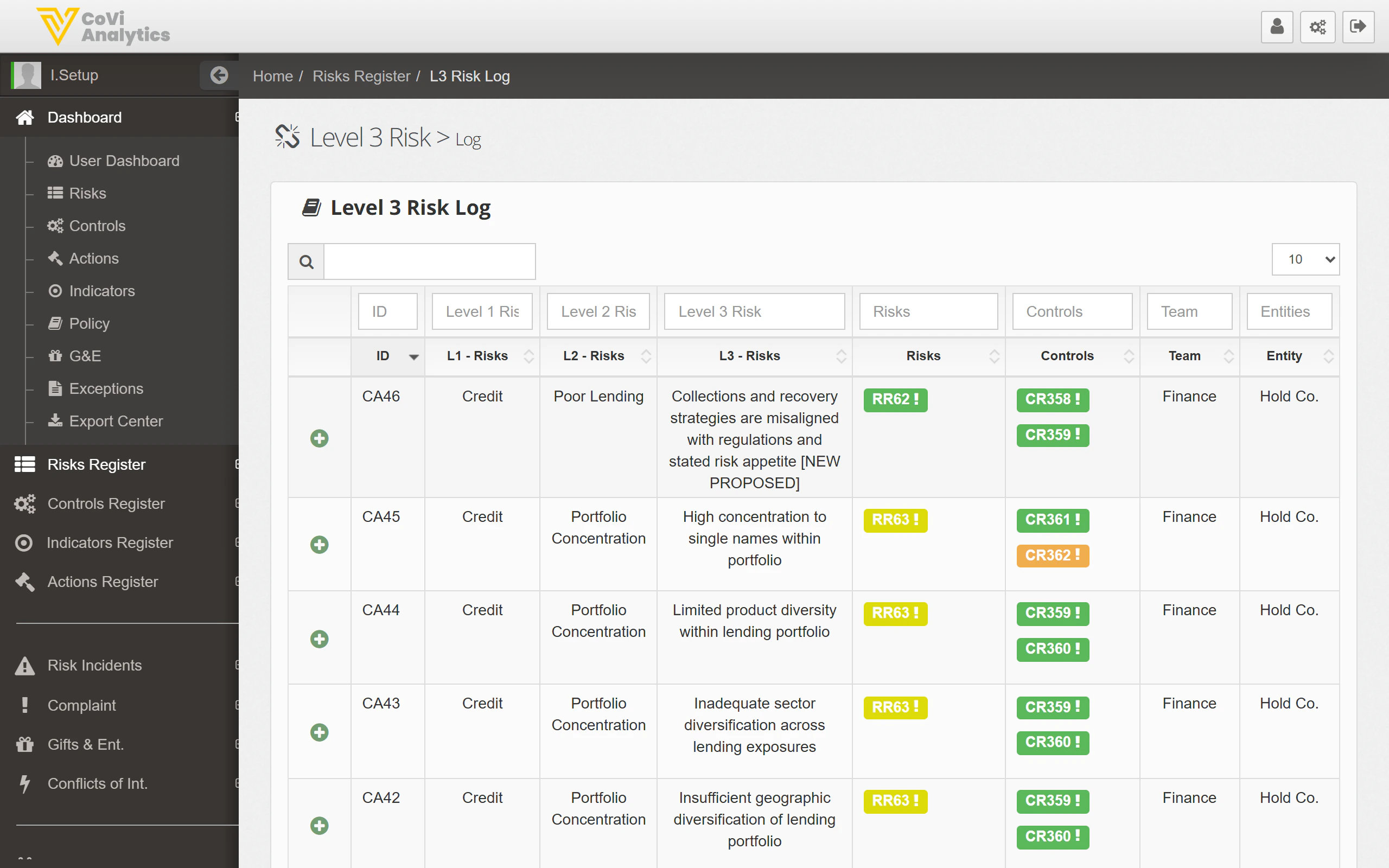
The L3 Risk Log (Level 3 Risk Log) maps your most granular risk descriptions to the broader risk hierarchy. Each row connects an L3 risk description to its parent L1 and L2 categories, and shows which risks and controls are linked. Use this page to understand the full taxonomy behind your risk framework and to verify that every detailed risk scenario has appropriate coverage.
From the sidebar, expand **Risks** and click **L3 Risk Log**.
 ## How to use it
### Searching and filtering
* **Search box** — type any keyword to search across all columns, including the detailed L3 risk descriptions
* **Column filters** — use the filter row beneath the column headers to narrow by any field
### Understanding the columns
| Column | What it shows |
| ------------ | ------------------------------------------------------------------------------------------------------------------- |
| **ID** | The unique L3 reference (e.g., CA46) |
| **L1 Risks** | The top-level risk category (e.g., Credit) |
| **L2 Risks** | The mid-level risk grouping (e.g., Poor Lending) |
| **L3 Risks** | The detailed risk description — the most granular level of your risk taxonomy |
| **Risks** | Linked risk badges (e.g., RR2) — click any badge to open that risk's [Risk Card](/risks/risk-card) |
| **Controls** | Linked control badges (e.g., CR358) — click any badge to open that control's [Control Card](/controls/control-card) |
| **Team** | The team responsible for this area of the taxonomy |
| **Entity** | The legal entity this L3 risk applies to |
### Understanding the risk hierarchy
CORE uses a three-level risk taxonomy:
* **L1** — the broadest risk category (e.g., Credit, Operational, Financial)
* **L2** — a more specific grouping within the L1 category (e.g., Poor Lending, Counterparty Default)
* **L3** — the most detailed risk scenario describing a specific way the risk could materialise
This hierarchy ensures that every risk in the [Risk Register](/risks/register) traces back to a well-defined taxonomy, which supports consistent risk identification and reporting across the organisation.
### Linked items
The **Risks** and **Controls** columns show coloured badges representing the risk register entries and controls associated with each L3 risk. These links are critical for demonstrating coverage:
* A row with no linked controls may indicate a gap in your control framework
* A row with many linked risks suggests this is a common scenario across multiple parts of the business
## Tips & Tricks
Use the L3 Risk Log during your annual risk identification exercise. Walk through each L3 description and ask whether the linked controls are still appropriate and sufficient.
Filter by **Team** to see only the L3 risks relevant to a specific department. This makes it easier to run targeted risk workshops.
Rows without any linked controls or risks deserve attention. An L3 risk with no coverage may represent an unmitigated exposure — or it may simply need its links updating after a recent restructure.
The L3 Risk Log is a reference view of your taxonomy. To change a risk's classification or add new L3 entries, speak to your risk framework administrator.
## How to use it
### Searching and filtering
* **Search box** — type any keyword to search across all columns, including the detailed L3 risk descriptions
* **Column filters** — use the filter row beneath the column headers to narrow by any field
### Understanding the columns
| Column | What it shows |
| ------------ | ------------------------------------------------------------------------------------------------------------------- |
| **ID** | The unique L3 reference (e.g., CA46) |
| **L1 Risks** | The top-level risk category (e.g., Credit) |
| **L2 Risks** | The mid-level risk grouping (e.g., Poor Lending) |
| **L3 Risks** | The detailed risk description — the most granular level of your risk taxonomy |
| **Risks** | Linked risk badges (e.g., RR2) — click any badge to open that risk's [Risk Card](/risks/risk-card) |
| **Controls** | Linked control badges (e.g., CR358) — click any badge to open that control's [Control Card](/controls/control-card) |
| **Team** | The team responsible for this area of the taxonomy |
| **Entity** | The legal entity this L3 risk applies to |
### Understanding the risk hierarchy
CORE uses a three-level risk taxonomy:
* **L1** — the broadest risk category (e.g., Credit, Operational, Financial)
* **L2** — a more specific grouping within the L1 category (e.g., Poor Lending, Counterparty Default)
* **L3** — the most detailed risk scenario describing a specific way the risk could materialise
This hierarchy ensures that every risk in the [Risk Register](/risks/register) traces back to a well-defined taxonomy, which supports consistent risk identification and reporting across the organisation.
### Linked items
The **Risks** and **Controls** columns show coloured badges representing the risk register entries and controls associated with each L3 risk. These links are critical for demonstrating coverage:
* A row with no linked controls may indicate a gap in your control framework
* A row with many linked risks suggests this is a common scenario across multiple parts of the business
## Tips & Tricks
Use the L3 Risk Log during your annual risk identification exercise. Walk through each L3 description and ask whether the linked controls are still appropriate and sufficient.
Filter by **Team** to see only the L3 risks relevant to a specific department. This makes it easier to run targeted risk workshops.
Rows without any linked controls or risks deserve attention. An L3 risk with no coverage may represent an unmitigated exposure — or it may simply need its links updating after a recent restructure.
The L3 Risk Log is a reference view of your taxonomy. To change a risk's classification or add new L3 entries, speak to your risk framework administrator.