

Overview
The Business Processes List gives you a complete inventory of the business processes your organisation has documented in CORE. Each process can be broken down into individual activities, assigned to teams, and linked to risks and controls. Use this page to find existing processes, check their status, and create new ones.How to use it
Process selector
At the top of the page, you will see a visual grid of process tiles. Each tile represents a documented business process (e.g. Capital Model Run, Business Plan Review, SII Balance Sheet, SII Report Production, Marketing Oversight). Click any tile to navigate directly to that process.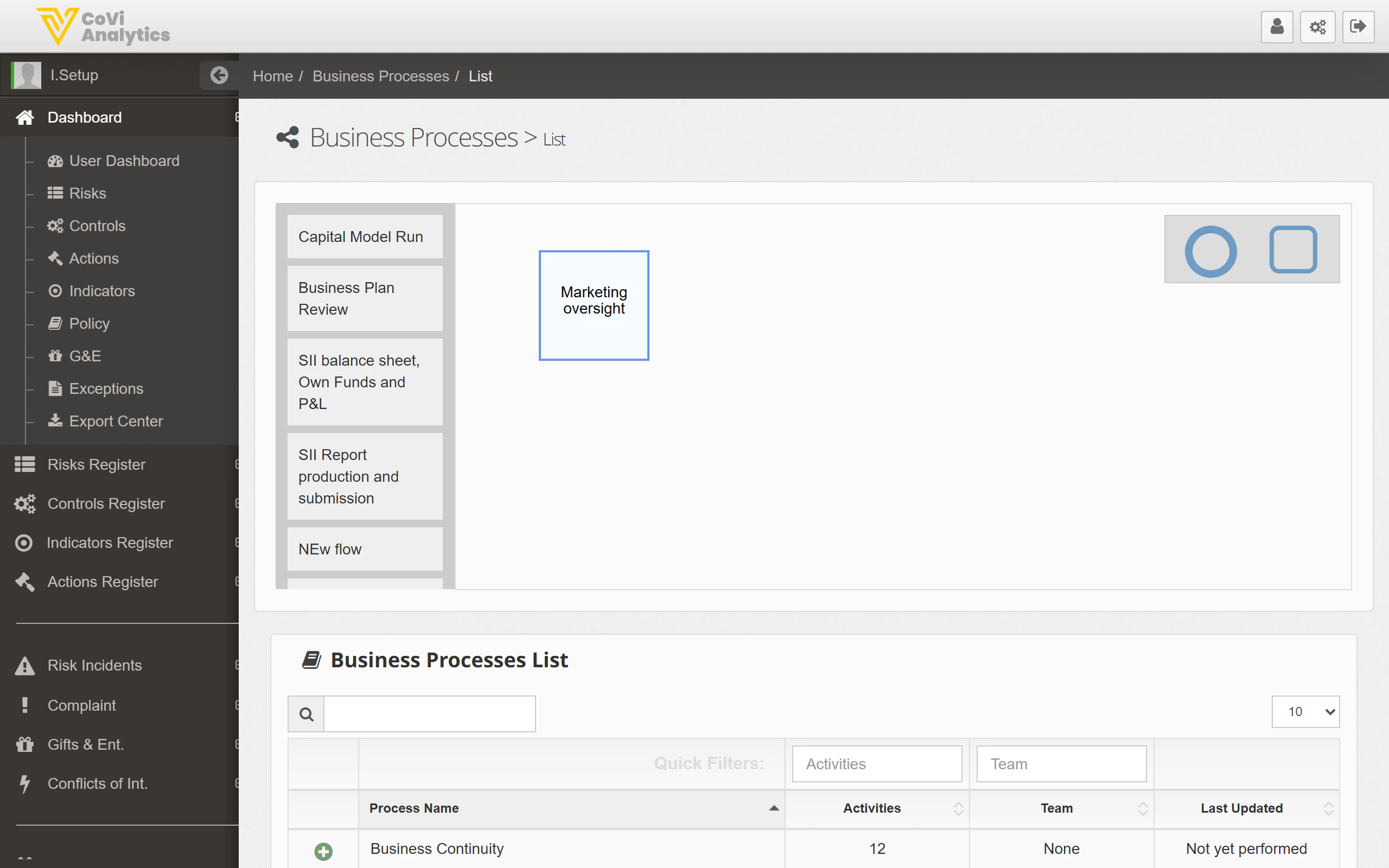
Process table
Below the tile selector, the Business Processes List table provides a detailed view of every process:- Process Name — The name of the business process.
- Activities — The number of individual activities or steps mapped within the process.
- Team — The team responsible for the process.
- Last Updated — The date the process was last modified.
Searching and filtering
Use the search box to find a process by name. Filters are available to narrow the list by team or other attributes.Creating a new process
Click the + Add New button to define a new business process. You will be guided through naming the process, assigning it to a team, and setting up its initial structure.Tips & Tricks
The Activities count tells you how granular each process map is. If a process shows zero activities, it has been created but not yet broken down into steps. See Business Processes Map to build out the flow.