

Overview
The Gifts & Entertainment Log is the detailed register of every gift and entertainment declaration recorded in CORE. While the G&E Dashboard gives you a summary view with charts and value-band breakdowns, the log is where you go to find specific records, review declaration details, and manage individual entries.How to use it
Navigating to the G&E Log
From the sidebar, select Gifts & Entertainment and then Log. The full register loads in the main content area.Browsing and searching
The log displays all declarations in a table format. You can:- Search — use the search box to find records by ID, stakeholder name, type, or keyword. Results filter as you type.
- Sort — click any column header to reorder the table ascending or descending.
- Filter — use the dropdown filters to narrow records by Team, Entity, or other available criteria.
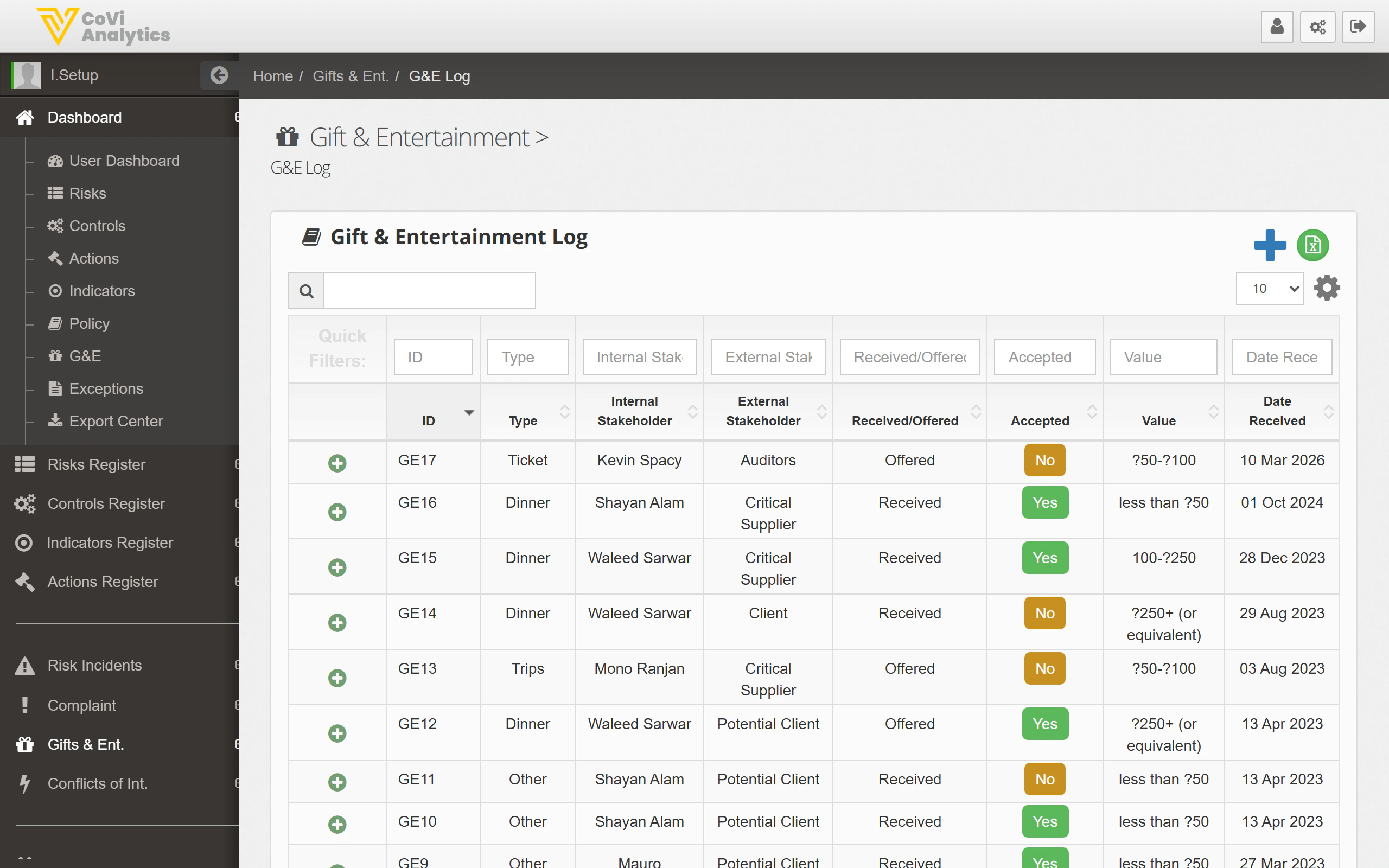
Understanding the table columns
The log follows the standard CORE register pattern. Key columns include:Opening a record
Click any row to open the full declaration. From the detail view you can:- Review the full description and supporting documentation.
- Check or update the approval status.
- Add notes or comments for the audit trail.
- View the change history.
Pagination
For organisations with a large volume of declarations, the log is paginated. Use the navigation controls at the bottom of the table to move between pages.Tips & Tricks
The G&E Log and the G&E Dashboard share the same underlying data. Any record you update here is immediately reflected in the dashboard’s status tiles and chart.